
Here are few tricks to find out who is staying in invisible
1) Just go to
http://www.invisible.ir
http://www.xeeber.com
and enter victims Yahoo! ID… Click go and you are done!
IT REALLY WORKS :)
2) Sometimes some of your friends who appear offline in yahoo messenger may not be actually offline,they may in the 'Invisible' mode.This maybe if they are trying to ignore you or are too busy to talk to anyone.
There is this small trick that you can use to find out what the truth is.
Firstly open your yahoo messenger main window and double click on the name of the person whom you want to check.The chat window will open obviously.
Click IMVironment button, select See all IMVironments, select Yahoo! Tools or Interactive Fun, and click on Doodle.
After loading the Doodle imvironment there can be two possibilities
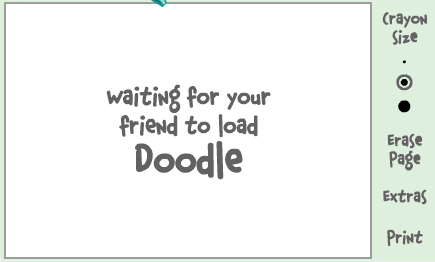
(I) If the user is offline Doodle are will show this "waiting for your friend to load Doodle" continuously .See in the picture below:
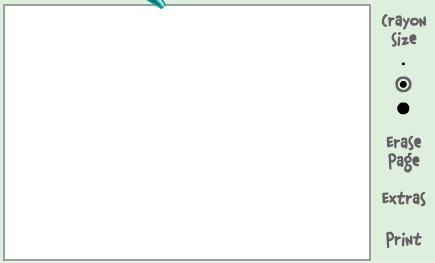
(II) If the user is online (but in invisible mode), after few seconds (it can take up to one minute, depending on your connection speed), you should get a blank page like in the picture below.So you know that the user is online.
Isn't that great???
Here is an alternative to find invisibility in Yahoo!
3) Choose a person you want to check .Double click to open the chat window.Now simply invite the person for a voice conference.This is done by clicking on the "conference' button on the top of the chat window.
If the talk button appears and turns green then that person is online.But if you receive the message 'Voice chat could not be started ' then the person is offline.
Note:Some people use softwares like buddy spy to check who is invisible.I DONT RECOMMEND you to use such third party softwares as they can expose your Pc to hackers by sending your personal information and can even steal information from your Pc.So avoid such softwares and instead use the simple tricks given above.
Need few More steps! Just send me a message using the chat tool in homepage or mail me regarding this...
So, Keep Enjoying...
Here is one more trick to make your folder invisible without using any software.
Guys, as you can guess with this trick you can make your folders invisible without using any sophisticated software. This is a very unusual & easy trick to make your private folders invisible to others. :)
A folder contains two parts; an icon and a name.
So to make the folder invisible you will have to make both the icon & the name invisible.
These are the steps to do that:
1. *For Making The Name Invisible*
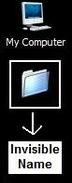
Select the folder which you want to make invisible. Press F2 key then type ALT+0160 and hit enter key. You will notice that the name of the folder has become invisible. See the snapshot below.
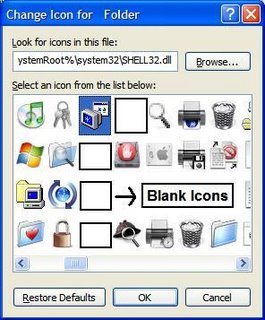
Right click on the folder whose name you made invisible. Go to Properties, then go to the Customize tab. Then click on the Change Icon button. Select any blank icon there. Remember there will be many blank icons (see snapshot). Just choose any one.
Click OK.
Do you Want to speed up your System Shutdown in Windows XP?
Tired of waiting while your windows shuts down? Now no more wait, thanks to this cool trick.
The trick is in two parts. Follow both of them for best results.
1. Open the Registry Editor (Start >> Run >> type regedit).
2. Navigate to HKEY_LOCAL_MACHINE/SYSTEM/CurrentControlSet/Control
3. Click on the "Control" Folder.
4. Select "WaitToKillServiceTimeout".
5. Right click on it, select modify and set it a value lower than 2000 (the lesser the faster, but remember don't set it less than 100 to be on the safer side).
Like previous versions of windows, it takes long time to restart or shutdown Windows XP when the "Exit Windows" sound is enabled. To solve this problem you must disable this useless sound. Follow these steps to disable this sound.
1. Go to Start -> Control Panel -> Sounds and Audio Devices.
2. Click on the Sounds tab, then under program events and windows menu find and select the "Exit Windows" option.
3. Now there will be several sounds to choose from. Choose "(None)" and then click on Apply and then OK.
Yippee!! it's done now. You will see some improvement when shutting down your system. :)
Here is a trick to enable right click on those sites whicch disable that option.
These days lots of websites disable right clicking function of the mouse button. It's really, really annoying. This is done so that you don't steal (via right-click->save picture) their photos or images or any other goodies. Unfortunately, it disables all right-click functionality: copy, paste, open in new window.
But here's a trick to bypass that. But sadly it only works in Internet Explorer:
Follow these steps:
1. Open Internet Explorer.
2. Go to "Tools"->"Internet Options".
3. Click on the "Security" tab.
4. Then click on "Custom Level".
5. Scroll down to the "Scripting" section.
6. Now set "Active Scripting" to "Disable".
7. Now a dialog box will appear. Click yes to confirm the change.
8. Click "OK" and close the tools window.
Note: If this tweak causes some problem while surfing some sites, you'll have to turn that setting back to "Enable". This is because generally Javascripts enhances a website.
Here is a way to change Yahoo Messenger's Title bar text.
Hey guys now you can change the Yahoo Messenger 's title bar which this little tweak.
Note: Before trying this tricks make sure to close all instances (windows) of yahoo messenger.
Just follow these steps:
1. Open you yahoo messenger installation folder (default C:\Program Files\Yahoo!\Messenger).
2. Then search a file named "ymsgr". Double click to open it. If it doesn't open, then use notepad to open this file.
3. In this file just go to the end and paste the following code in a new line:
[APP TITLE]
CAPTION=Cool Wizard
As you can guess, you can replace the word Cool Wizard with any text of your choice. You can have your own name being placed in yahoo messenger title bar.
Now open your yahoo messenger and see the change. :)
Now you can include tabs in the chat window in Yahoo Messenger.
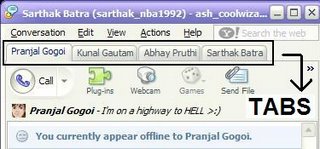
Imagine chatting with 5-6 friends at a time and you whole computer screen is filled with chatting windows. It just seems a nightmare. So guys there's a solution to this problem. With this registry tweak you can mod your yahoo messenger so it won't open multiple windows while chatting with many people at the same time.
You will have tabs for different friends like these days we have tabs in browsers. If you don't want tabs at a particular time, you can also turn off this feature with a simple right click on the person's tab and choose open in new window. This little hack will change your chatting experience because you will have a neat screen to look at.
I have made two registry files for the mod. Just download the file and unzip it. It will have two registry file; one named "Tabs" and one "No Tabs". If you want to enable tabs in your messenger just double click on "Tabs" file and click ok when a dialog box appears.
While you can turn off the tab feature in yahoo messenger itself, I have also provided a "No Tabs" registry file so that in case you want this feature to be completely out of your messenger, you can simple double click on this file and choose ok when a dialog box appears.
Here is the link where you can download the file.
Here is one more trick to chat with multiple ID's signed in
Yes, You are right. We were discussing about the option "MULTI YAHOO MESSENGER". Ever wondered that you can chat in yahoo messenger with multiple IDs.
Yes, now its possible to do it without using any external software like Yahoo Multi Messenger.
It's very simple. just follow these steps.
1. Install yahoo messenger on your PC.
2. Make sure you are not logged in and yahoo messenger application is closed.
3. Create a blank notepad file and type in it exactly as stated below:
Windows Registry Editor Version 5.00
[HKEY_CURRENT_USER\Software\yahoo\pager\Test]
"Plural"=dword:1
4. Save this file with any name and with extension as .reg
5. Now double click on this file to open it.
6. You will get a confirmation dialog box.
7. Click Yes and you will get another dialog box.
Your are done. Cheers :) Enjoy chatting !!!!
Solution for "Registry Editing has been disabled by your administrator".
If you people have ever encountered an error like this, "Registry Editing Has Been Disabled By Your Administrator" on Windows XP or any other Windows NT Operating system, this may help you!
I have encountered the above error many times while patching the registry. Even manual "regedit" command was not working.
So, here is simple solution:
1. Go to "Start >> Run" or press "Windows Key + R".
2. Type this command exactly as given below (or you can copy-paste it too)
REG add HKCU\Software\Microsoft\Windows\CurrentVersion\Policies\System /v DisableRegistryTools /t REG_DWORD /d 0 /f
Cheers!!! Your problem is now solved.